

Why Is USDT TRC20 Fee So High? Cut 27 TRX to 0.8 TRX
Why does a USDT TRC20 transfer burn 13–27 TRX in 2026? Learn how 65k vs 131k energy works and cut your TRON transfer fee by up to 94% in seconds.
Many crypto users chose TRON expecting $1 USDT transfers, only to watch their wallet burn 13 to 27 TRX on a single send. The fee didn't jump because you sent a large amount—it jumped because of how TRON's smart-contract Energy model works when your wallet holds no energy.
The good news: you can cut that fee from 13–27 TRX down to 0.8 TRX in under a minute. Here is why the fee spikes and how to stop overpaying.
The 3 Real Reasons USDT TRC20 Fees Feel Expensive
Unlike native TRX transfers (which only use free daily Bandwidth), USDT TRC20 is a smart contract. Every transfer executes contract code on the TRON Virtual Machine (TVM), which consumes Energy:
- Zero Energy in your wallet triggers TRX burn: Unless you stake thousands of TRX or rent energy beforehand, TRON burns your TRX balance at the network's dynamic energy unit price (
210 SUN/energyor higher). - Sending to an address with 0 USDT doubles the cost: Creating a brand-new USDT balance record in the contract takes ~131,000 energy instead of ~65,000 energy.
- Unactivated addresses add another 1 TRX: If the recipient address has never been used on-chain before, TRON charges an extra 1 TRX account-creation fee.
Exact USDT TRC20 Cost Breakdown (2026)
| Recipient Wallet Status | Energy Needed | Burning TRX Directly | Renting Energy (Tron4u) | Savings |
|---|---|---|---|---|
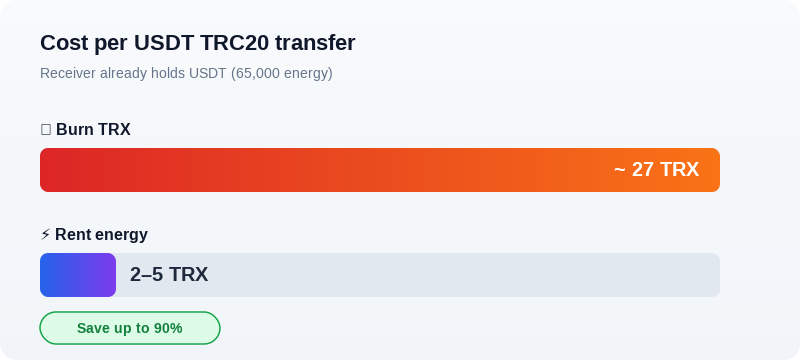
| Active + already holds USDT | ~65,000 | ~13–14 TRX | From 0.8 TRX | Up to 94% |
| Active + holds 0 USDT | ~131,000 | ~27–28 TRX | From ~1.6 TRX | Up to 94% |
| Unactivated new address | ~131,000 + activation | ~28–29 TRX | Activate (1 TRX) + rent | Up to 90% |
Want exact live numbers before hitting Send? Run your transfer count through the USDT TRC20 Fee Calculator or inspect the recipient's USDT balance with our TRON Address Lookup.
Why Exchange Withdrawals Also Charge 1–2 USDT
Exchanges like Binance, OKX, and Bybit charge flat withdrawal fees (typically 1–2 USDT on TRC20) to cover their own energy overhead and operational margin. When you transfer from a self-custody wallet (TronLink, Trust Wallet, TokenPocket, Ledger), you pay TRON's raw network resource cost directly—which is why burning TRX hurts so much more unless you supply energy first.
3 Ways to Stop Paying 13–27 TRX Per Transfer
1. Rent TRON Energy Per Transfer (Best for Most Users)
Instead of burning TRX or locking thousands of TRX in staking, rent the exact energy you need right before transferring:
- Open Tron4u Energy Rental (no signup, no KYC).
- Pick 1 transfer (~65k energy) if the receiver holds USDT, or 2 transfers (~131k energy) if their USDT balance is 0.
- Send the quoted TRX from the sending wallet—energy is delegated on-chain within seconds.
- Send your USDT as usual; your wallet uses the rented energy instead of burning TRX.
2. Check Recipient Activation First
If you are sending to a fresh wallet, check it on our TRON Address Activation Checker. Sending a tiny TRX fraction first activates the account cleanly and avoids failed or inflated contract executions.
3. Stake TRX Only If You Transfer Daily at High Volume
Self-staking avoids both burning and renting, but requires locking thousands of TRX with a 14-day unstake cooldown. For fewer than ~30 transfers per month, renting is far more capital-efficient. See the full break-even math in Energy Rental vs. Staking TRX.
Bottom Line
High USDT TRC20 fees are completely avoidable. Check the recipient with TRON Address Lookup, estimate live savings in the USDT Fee Calculator, and rent TRON energy from 0.8 TRX before you hit send. For a full walkthrough, read How to Rent TRON Energy: Step-by-Step Guide and The Complete Guide to USDT TRC20 Transfer Fees.
Start Saving on TRX Fees Today
No registration required. Just transfer and go. Log in for extra discounts and features.
Frequently asked questions
Why did my USDT TRC20 transfer cost 27 TRX?
A USDT TRC20 transfer to an address that currently holds zero USDT consumes roughly 131,000 energy (about double a normal transfer). Without energy in your wallet, TRON burns roughly 27 TRX automatically to cover the smart contract execution.
Why does the same USDT transfer cost 13 TRX sometimes and 27 TRX other times?
Sending USDT to a wallet that already holds USDT requires ~65,000 energy (~13.5 TRX burned). Sending to a wallet with 0 USDT creates a new token storage slot on-chain, requiring ~131,000 energy (~27 TRX burned). An unactivated recipient adds another 1 TRX.
How can I reduce USDT TRC20 fees without staking TRX?
Rent TRON energy on demand before sending. Renting ~65,000 energy starts from 0.8 TRX per transfer—up to 94% cheaper than burning TRX—and arrives in seconds with no signup or capital lockup.
Does the USDT transfer amount change the TRC20 fee?
No. Sending 10 USDT and sending 100,000 USDT consume the exact same amount of energy on TRON. Only the recipient's USDT balance, activation state, and your available energy affect the fee.
Related posts
Why Is My USDT on TRON Blocked? Blacklist Check Guide
USDT TRC20 transfer blocked or frozen? Learn how Tether's TRON blacklist works, check any address free on-chain, and share live proof before OTC deals.
Fix TronLink & TokenPocket OUT_OF_ENERGY Errors (2026)
USDT TRC20 transfer failed with OUT_OF_ENERGY in TronLink or TokenPocket? See why your TRX was burned, decode your TXID, and fix it for 0.8 TRX.
Top TronAgg, Feee.io & TronSave Alternatives (2026)
Comparing TronAgg alternatives, Feee.io, TronSave, TronEnergy.Market, and Tron4u in 2026: live prices from 0.8 TRX, no-signup UX, API, and MCP support.